Search & Ask
One bar, five ways to use it. Press ⌘F in Graph and it slides out over the canvas, cursor ready.
Opening and closing
- ⌘F, the magnifier in the top bar, or Search the Graph in the Search menu. Each query mode in the Search menu (⌘1 to ⌘5) also opens the bar, already in that mode.
- Find a node on the empty canvas opens it in Raw Text.
- Esc closes the dropdown; a second Esc puts the bar away. A click on empty canvas puts it away too. Closing the bar keeps the answer: open it again and it’s there.
- The table (⌘T) and the bar take turns: opening one closes the other.
While the bar is open, the sidebar shows History instead of the legend.
Anatomy of the bar
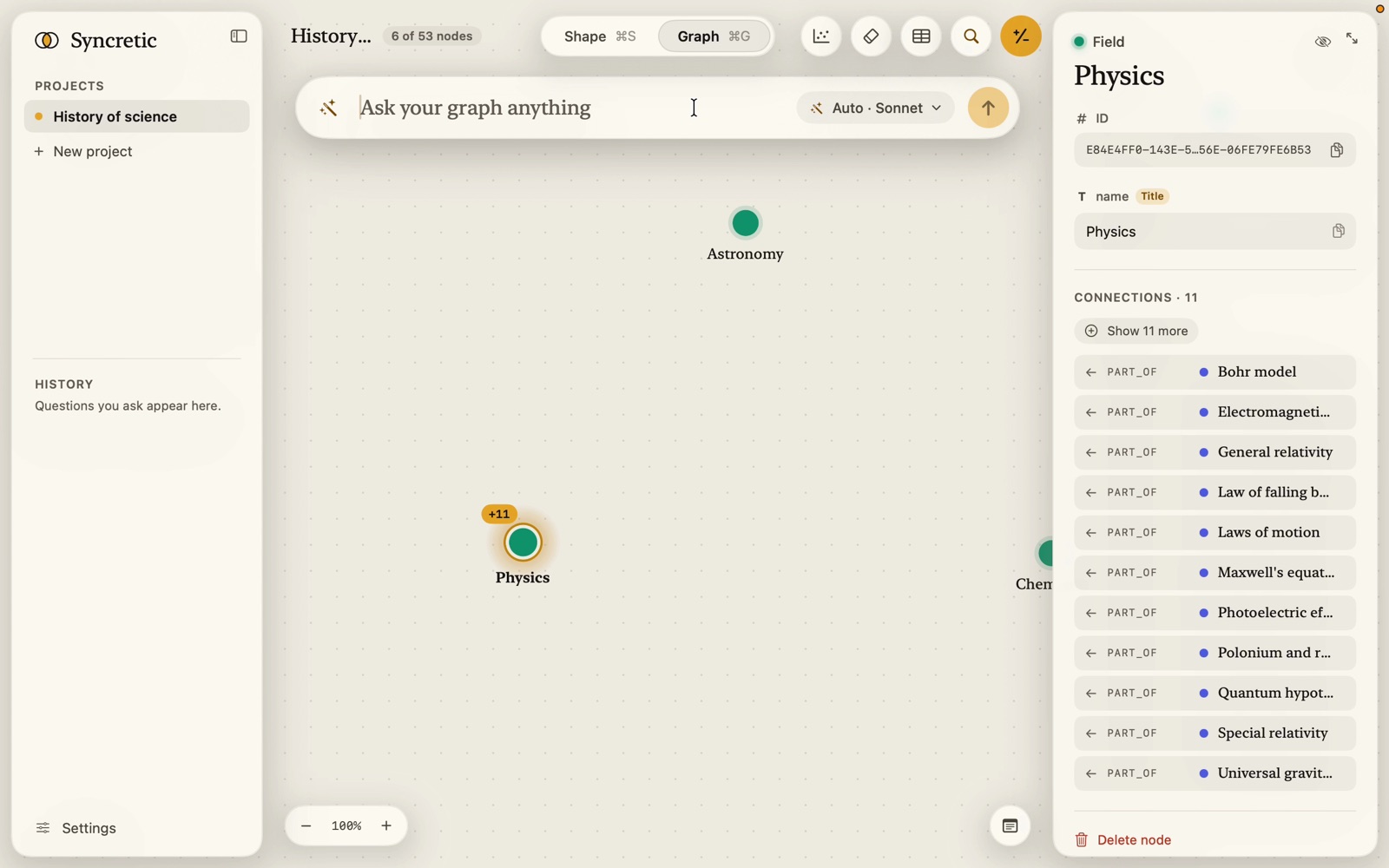
Left to right:
- The mode’s symbol: a wand for Auto, braces for Text to Cypher, a sparkle magnifier for Vector,
</>for Raw Cypher, a text magnifier for Raw Text. - In Raw Text and Vector, the scope pill: what text with no scope of its own searches (“All”, “Verse, Chapter”, “Verse +2”, or “None” in red). Click it to open the Search in list; Backspace at the very start takes it apart into a
::…::you can type in. See Scopes. - The field: serif, one line that scrolls sideways; mono in Raw Cypher. Its placeholder says what the mode wants: Ask your graph anything, Find by name or text, commas for several, Search by meaning, commas for several,
MATCH (n) RETURN n LIMIT 25. Text pasted with line breaks lands on one line. - × to clear the answer (after one), keeping your draft.
- The mode chip: “Auto · Sonnet”, “Text to Cypher · Sonnet”, “Vector”, “Raw Cypher”, “Raw Text”, or “Vector · nothing to search” when every property is unticked. Click it for the mode popover.
- The gold ↑ submits (Return does too); it spins while a question runs.
The dropdown
Click into the field or start typing and a panel opens under the bar:
- Recent: up to five of this project’s earlier questions that contain what you’ve typed (Raw Cypher lists only queries typed in Raw Cypher; other modes leave those out). Hover one for an × that forgets it.
- Try asking: starter questions made from your shape, such as Which concepts have a supports link from a source?, How many concepts are there?, Which concept has the most connections?, Which verses talk about the same idea, and what connects them? (when text is embedded), Show every source that has a link.
- In Raw Text and Vector, a scope tip:
::picks a type,::Type:property::a property,::A, B::several. Commas between terms find any of them. - Inside a scope, or in Raw Cypher, the dropdown becomes a completion list instead. See Scopes and Raw Cypher.
↑ ↓ move through the rows, Return runs the highlighted one, Tab completes a name.
The mode popover
Click the mode chip. Two tabs:
- Query mode: the five modes in two groups, each with a one-line blurb, its shortcut, and a tick on the current one. Under Vector, the Search in list of embedded properties with their passage counts; under Raw Text, every Text and Enum property (the title marked); under Auto, the embedding model’s status when text is embedded but the model isn’t ready.
- AI models: Writes queries (the model that turns your question into Cypher, and how hard it thinks) and Routing (the model that picks a strategy in Auto), the AI status row with Sign in / Update when needed, the privacy line (“Claude sees only your question and the shape of your graph. What’s in the graph stays here.”), and the vector search model’s status.
When the AI isn’t ready
Open the bar in Auto or Text to Cypher without Claude Code (or Codex) installed or signed in and the canvas shows a panel instead of nothing: Install Claude Code to ask Claude or Sign in to Claude Code to ask Claude, the privacy sentence, a note that vector search needs no account, the Install or Sign in button, and a link to Settings. Raw Text, Raw Cypher and Vector work regardless.
Everything a question does is read-only. A Cypher query, whoever wrote it, passes a keyword guard and then runs inside a read-only transaction. Nothing an answer does can change your graph.