Expanding and folding
The canvas grows by expanding nodes (bringing their neighbours in) and shrinks by folding (taking nodes off, with whatever came out of them). Nothing here changes the graph; it only changes what’s drawn.
What a click does
| Action | Effect |
|---|---|
| First click on a node | selects it and brings in its First-priority neighbours (once; a later first click only selects) |
| Second click on the selected node, or a double-click | brings in the next lot of its First and Normal neighbours (a double-click also unpins the node) |
| Click the +N badge | the next lot, the same as a second click |
| + or = | the next lot for every selected node |
| Show N more in the inspector | the next lot; the tooltip says which other ways do the same |
| A type chip in the inspector’s Connections section | only neighbours of that type (when more than one type is hidden) |
Neighbours come in by priority tier, then taking turns between kinds of connection, each kind in natural order of title, so a verse brings in its chapter, its purport and its first words rather than thirty words. Ad Hoc types never come in from a click: only from the right-click menu or the inspector’s type chips. The inspector says “12 Ad Hoc off the canvas · right-click to expand” when that’s all that’s left, or “All on the canvas”.
New nodes start on a small spiral around the node they came from and the layout settles them. Which node brought each in is remembered: that’s what folding uses.
The right-click menu
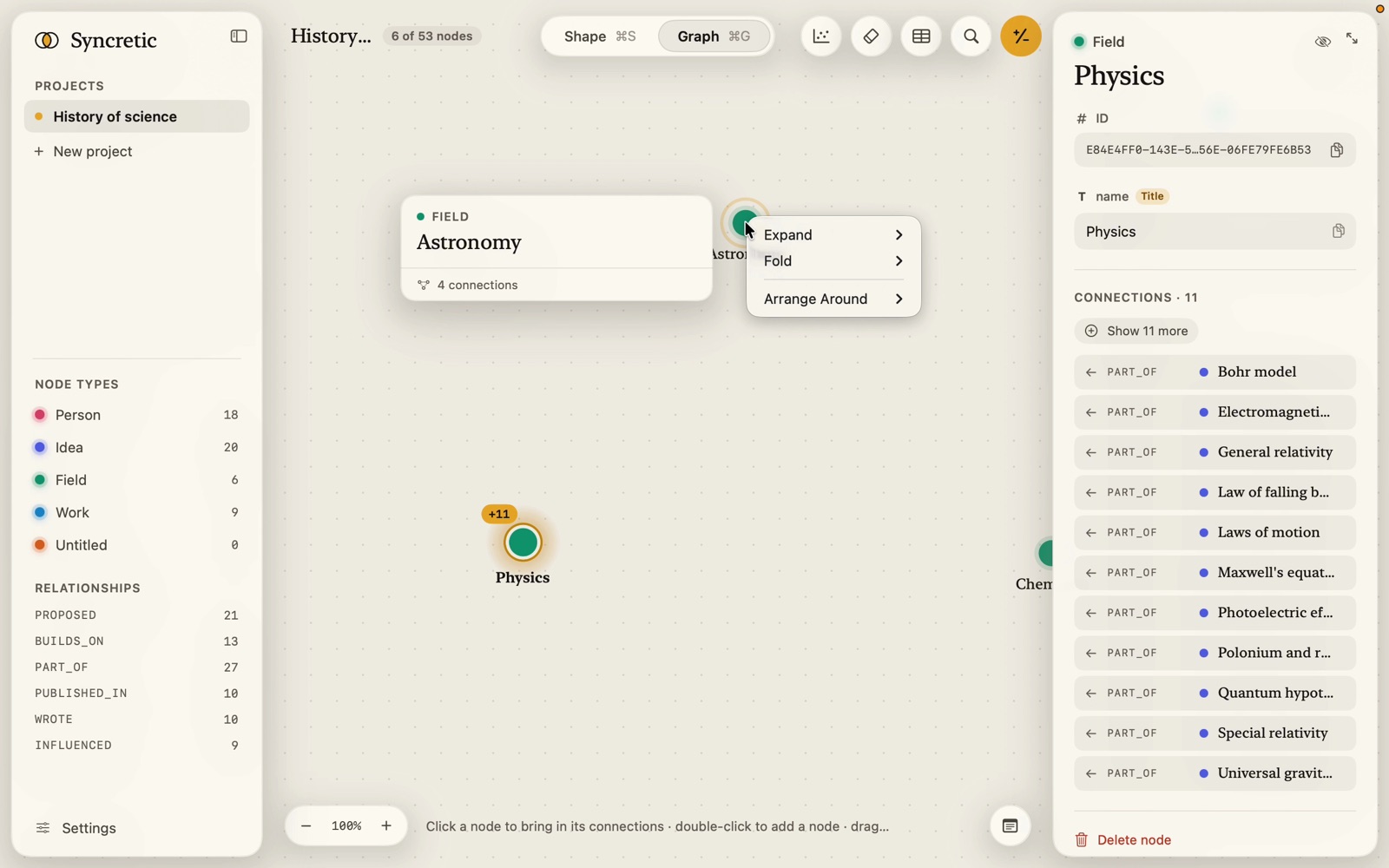
Right-click a node (or anywhere on the canvas while nodes are selected: the menu then acts on the selection, or on every node when nothing is selected). Entries show how many nodes they bring or take; anything with nothing to do is left out.
Expand
- All (n): every neighbour off the canvas, Ad Hoc included, each around the node it comes in under.
- Ad Hoc (n): only the Ad Hoc ones.
- By Node Type: one entry per type, with its colour dot.
- By Relation Type: one entry per relationship.
Fold
- Current Node Links (or Current Nodes’ Links): what the node points to goes, with what came out of it; the node and what points to it stay.
- All Except Current: everything else on the canvas.
- Ad Hoc Linked: the Ad Hoc nodes linked to it.
- By Node Type and By Relation Type: the linked nodes of that type or along that relationship.
Folding takes a node off together with everything that came out of it, except what’s still tied to a node that stays (and whatever came out of that). After a fold, the node opens up again on its next click.
Arrange Around (one node only): Rows, Rings, Spiral or Stacks of just this node and what’s connected to it, laid out by steps away, and Free Layout to go back. See Arrange around a node.
Hiding
H, the inspector’s eye-slash, or the Hide button on a multi-selection takes the selected nodes off with what came out of them only (the same rule as folding), and clears the selection. Clear the canvas (⇧⌘K) takes everything off.
The pager
After opening up a type or a node that has more than one lot, the pill at the foot reads Showing 25 of 212 Verse or Showing 25 of 80 connected to “Entropy”, with Show 25 more (gold) and Show all. It disappears when everything is on the canvas or the node leaves it.